Help
What Shae is
Shae is for the people you already see — in pairs and in crews.
Be a person once, and it remembers: your times, your crews, what you did together.
Nobody can find you by searching: there’s no search and no list of people. Anyone who has your handle sees your profile card, and anything you choose to show everyone, unless you hide it. Only your friends see the rest of your page.
What we’re for
| Against | For |
|---|---|
| Followers | Friends |
| The feed | The plan |
| Engagement | Attendance |
| The algorithm | Your crew |
| “Connected” | Together |
| The calendar grid | The overlap |
| “We should hang out” | “See you Thursday.” |
How it works
- 01
Start a plan.
A dinner, a call, a weekend, a game night. Know the date or not — Shae handles both.
- 02
Send one link.
Everyone joins with Google or an email. No app, nothing to download, about thirty seconds.
- 03
It’s actually happening.
Shae finds when you’re all free, you lock it in, everyone gets the details. And next time, it remembers everyone.
Who can see what
| What | Who can see it |
|---|---|
| Your calendar | Only you |
| Your free times | Your friends, as a few times you could both make. Crews you’ve chosen to share with, as a count. |
| Your name and face | Your friends, your crewmates, people holding a plan link, a crew you ask to join, and anyone who has your handle or holds a card you made |
| Your plans | The people in them, and anyone holding the plan’s link |
| Your email and number | Nobody but Shae |
| A card you make | Only you until it goes, then whoever holds its link. Shae never tells you when it’s opened. |
| Cards you keep, and dates Shae remembers for you | Only you |
Texts from Shae
Shae’s texts come from Syncs LLC (dba Shae.io). They’re sign-in codes and news about your plans, like an invite, a time once it’s locked in, or a reminder the day before.
They’re optional. Shae texts only when something happens on your plans, or when you ask for a code. Msg & data rates may apply.
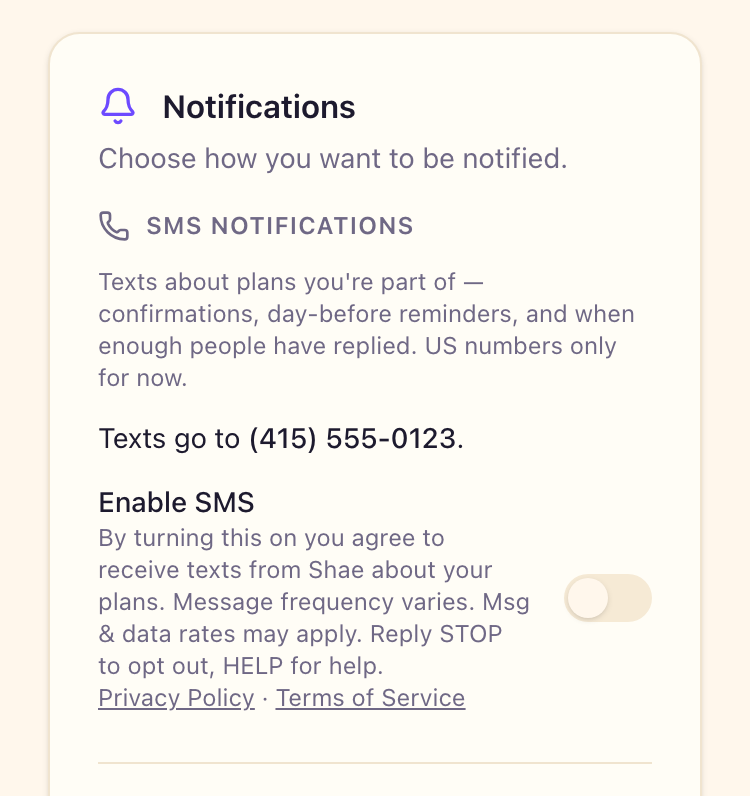
Reply STOP to stop them, or HELP for help. Or switch off Enable SMS in Settings, under Notifications.
Next to your number in Settings, it says:
By turning this on you agree to receive texts from Shae about your plans. Message frequency varies. Msg & data rates may apply. Reply STOP to opt out, HELP for help. Privacy Policy · Terms of Service
How Shae makes money
It doesn’t yet. When it does, it won’t be ads, and it won’t be you.